Which product categories brought in the most revenue last quarter?
- Comes back as
- Ranked bar chart, revenue by category
- Read from
- orders + order items + products
WooCommerceEasy Digital Downloads
Use cases
Glimpse BI reads the tables your plugins already write: orders, memberships, courses, bookings and more. Get the chart by asking in plain English, by clicking, or by writing the SQL.
Ask, by vertical
Ask checks real column values first, and asks you back when a word could mean two things. Every answer is a chart you can edit, save and pin.
Which product categories brought in the most revenue last quarter?
How many members joined each week, and how many lapsed?
Which courses have the lowest completion rate?
What is our no-show rate by staff member this month?
Which campaigns produced the most form submissions?
How much did each campaign raise, recurring against one-time?
Example questions. Ask is part of Glimpse BI Pro; the same charts can be built free with clicks or SQL.
Real dashboards
Actual Glimpse BI dashboards on representative store and subscription data, not illustrations.
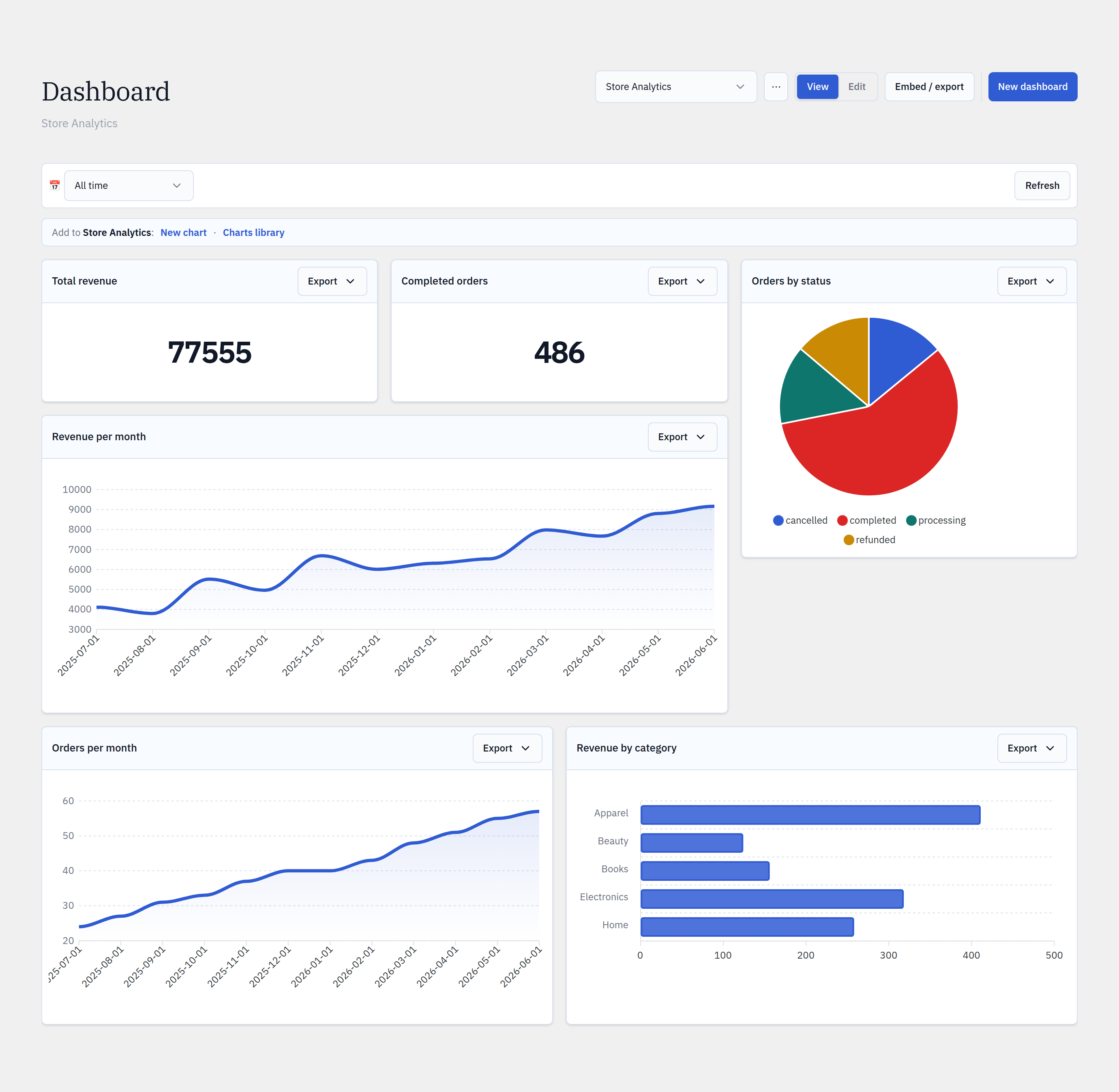
Revenue, completed orders, average order value, order-status mix, and revenue by category — straight from your store’s order tables.
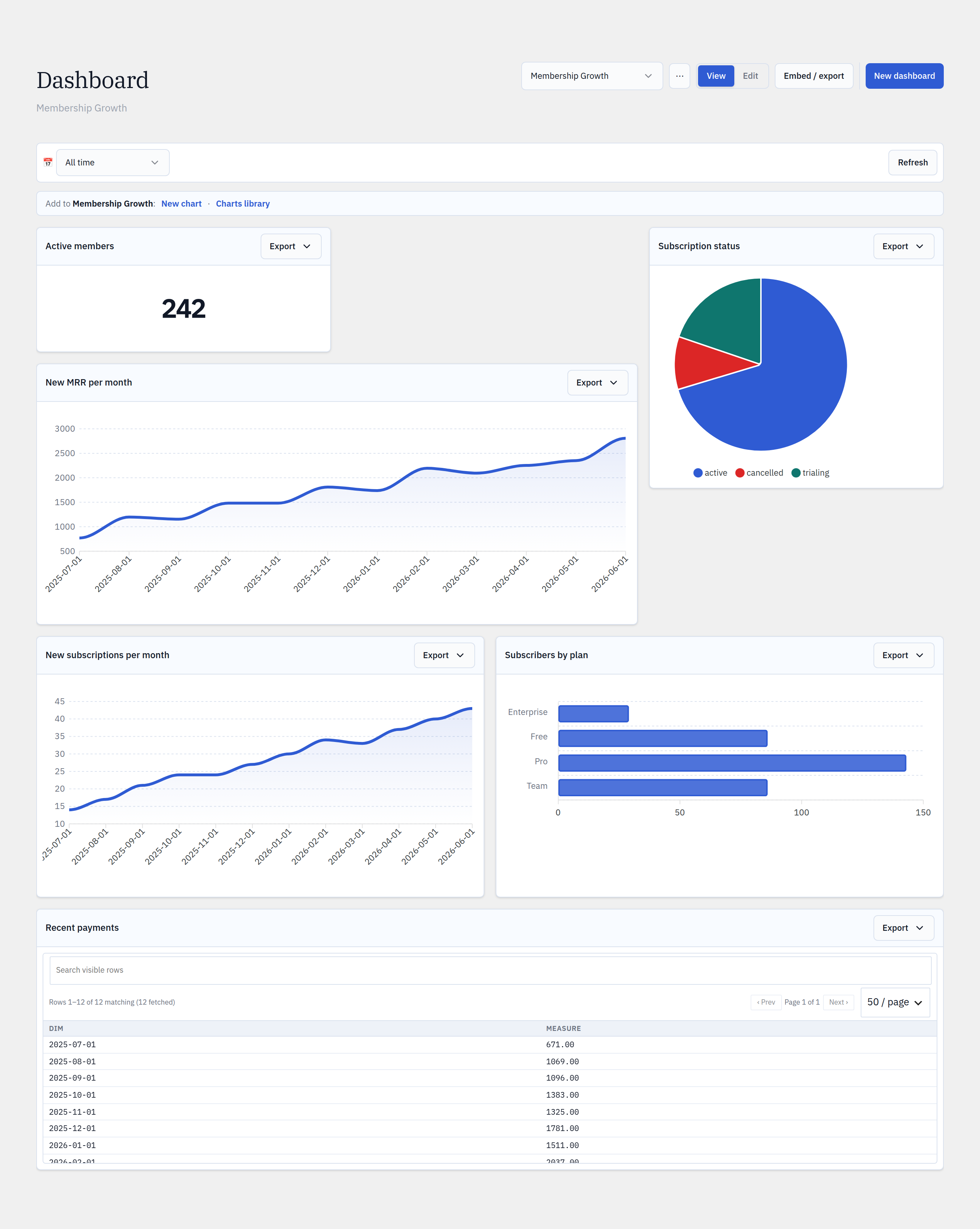
MRR, new subscriptions, plan mix, active members, and recent payments — the SaaS metrics your subscription plugin already records.
Live across verticals
The same builder, dashboards and embeds, re-pointed at whatever your stack records.
Every WordPress stack
No native integrations to configure. Glimpse BI reads the tables these popular plugins already create.
Track publishing cadence, top categories and tags, author leaderboards, and your most engaged commenters — the questions an editor-in-chief actually asks, straight from WordPress core.
Revenue by product, author, or period; average order value; refunds and coupon usage. Join orders against posts and users without exposing your database to an external BI tool.
Signups week over week, active vs. lapsed members, MRR trends, and churn — composed straight from the tables your membership plugin already writes.
Enrollments, course completion rates, quiz pass rates, and most-active learners — turn your learning platform’s tables into an at-a-glance instructor dashboard.
Appointments per day, no-show rates, busiest staff and services, revenue per slot. The same engine behind the one-click KiviCare clinic dashboard works for any scheduler.
Tickets sold per event, attendance over time, top-selling sessions, and capacity utilization — built from the tables your events plugin populates.
Submissions per form, conversion trends, and source breakdowns. Chart the entries your forms plugin stores to see which campaigns actually fill the pipeline.
Total raised by campaign, recurring vs. one-time gifts, average donation, and donor retention — a board-ready fundraising dashboard from your donation tables.
Build dashboards once, embed them for clients, and delegate with Editor roles across your client sites — one toolkit for every vertical above.
Don’t see your plugin? If it stores data in a WordPress table, Glimpse BI can chart it.
Start with the free plugin from WordPress.org. Upgrade to Pro to unlock Ask, pre-computed charts and Editor roles.